Every receipt takes the next number, the day’s total comes from the receipts, and attendance is marked on the phone. Set up for you, with no cut of your fees.
Real screens from Eduflowy. A demo school fills them in.
Fee collection
“Two receipts have the same number, and the day’s total doesn’t match the cash.”
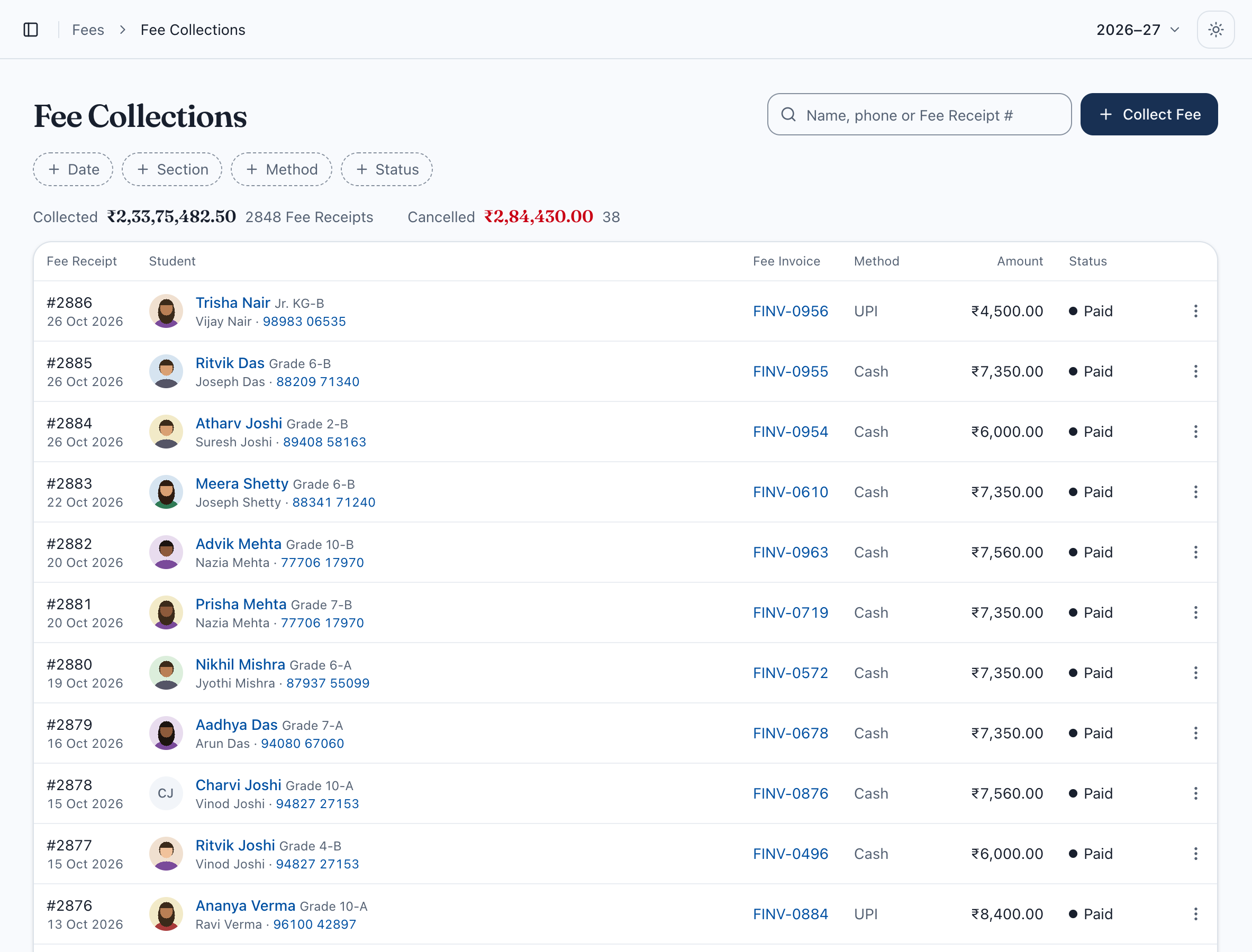
Every receipt numbered in order, every rupee accounted for.
Find the student by name or the parent’s phone, take the fee by cash, UPI or bank transfer, and print the receipt. Each receipt takes the next number. A correction or cancellation is saved with who made it and when.
Receipts numbered in order
Totals by date, section and method
Corrections kept, never erased
Instalments and dues
“Which instalments has this family paid? Let me check the register.”
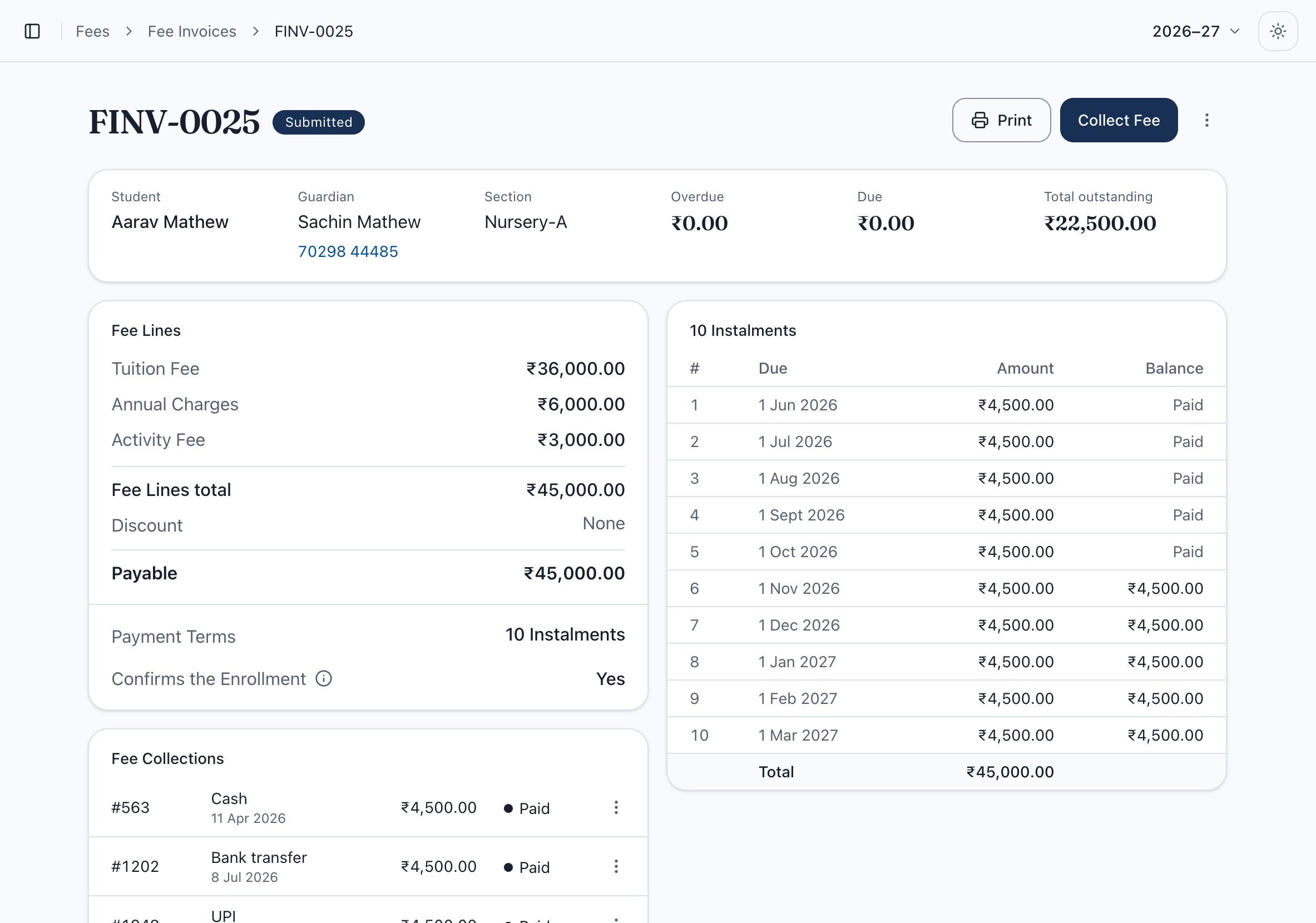
Each child’s fees, instalments and payments on one screen.
Set the fee structure once for each class. Every student gets their fee heads, any discount and up to 10 instalments, and you can see what is paid, what is due and what is overdue.
Up to 10 instalments a year
Sibling discounts and concessions
Overdue amounts shown in red
Attendance
“The list of students below 75% is made by hand the week before exams.”
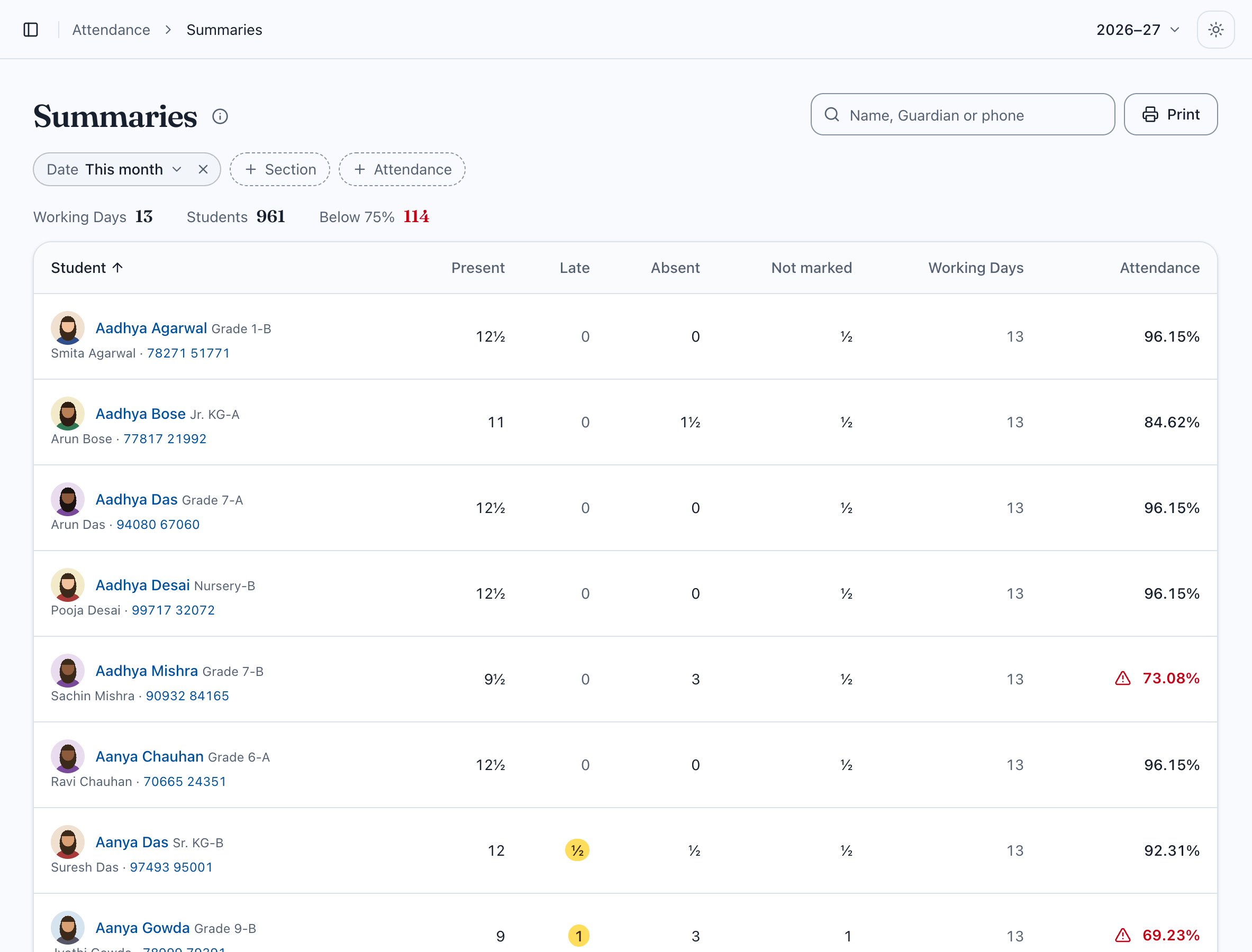
Teachers mark attendance on their phone. The office sees who is below 75%.
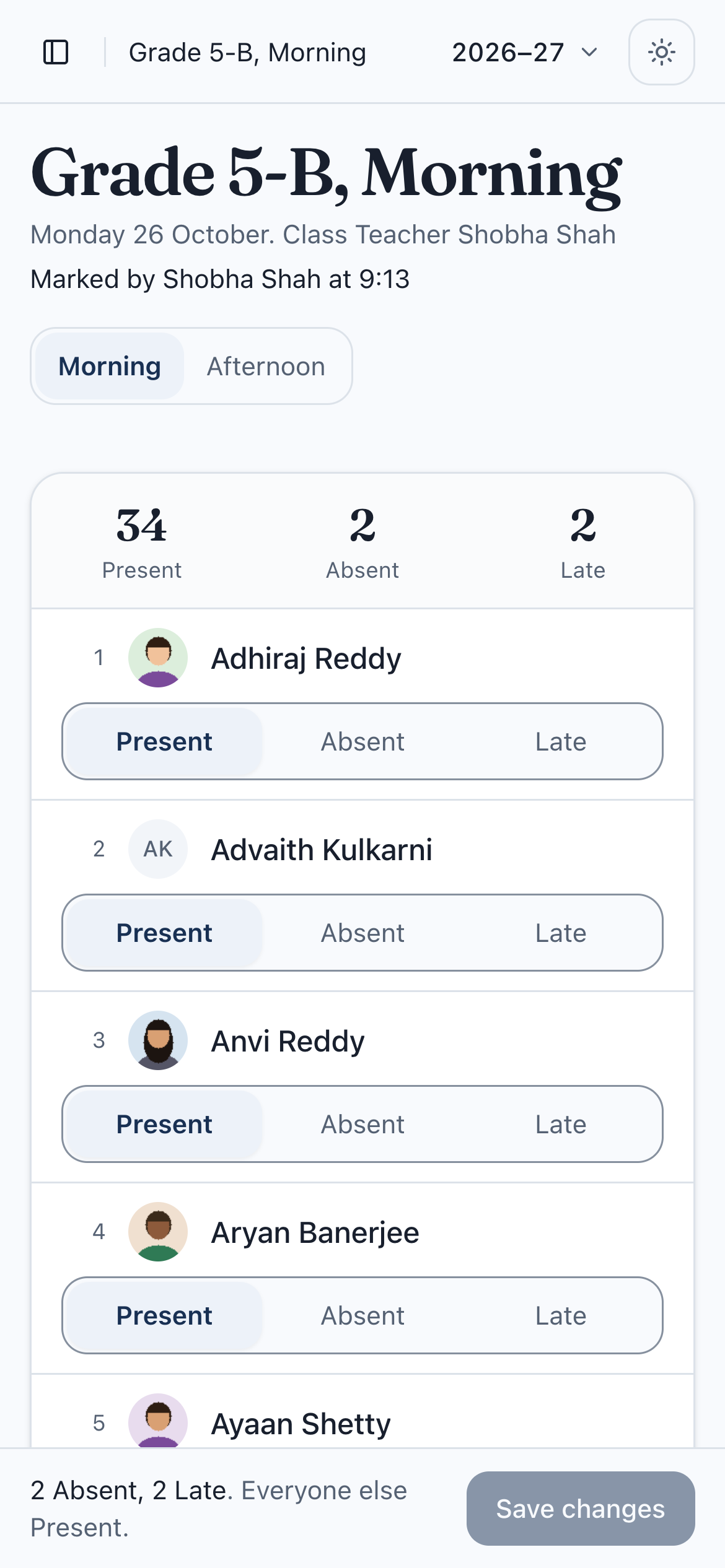
Every register starts with everyone Present, so a teacher taps only the children who are absent or late. Morning and afternoon registers are kept apart, and the summary flags every student under 75%.
Present, Absent or Late
Morning and afternoon registers
Students below 75% flagged
Students
“A parent is on the phone and the office is searching through three registers.”
One page for every student.
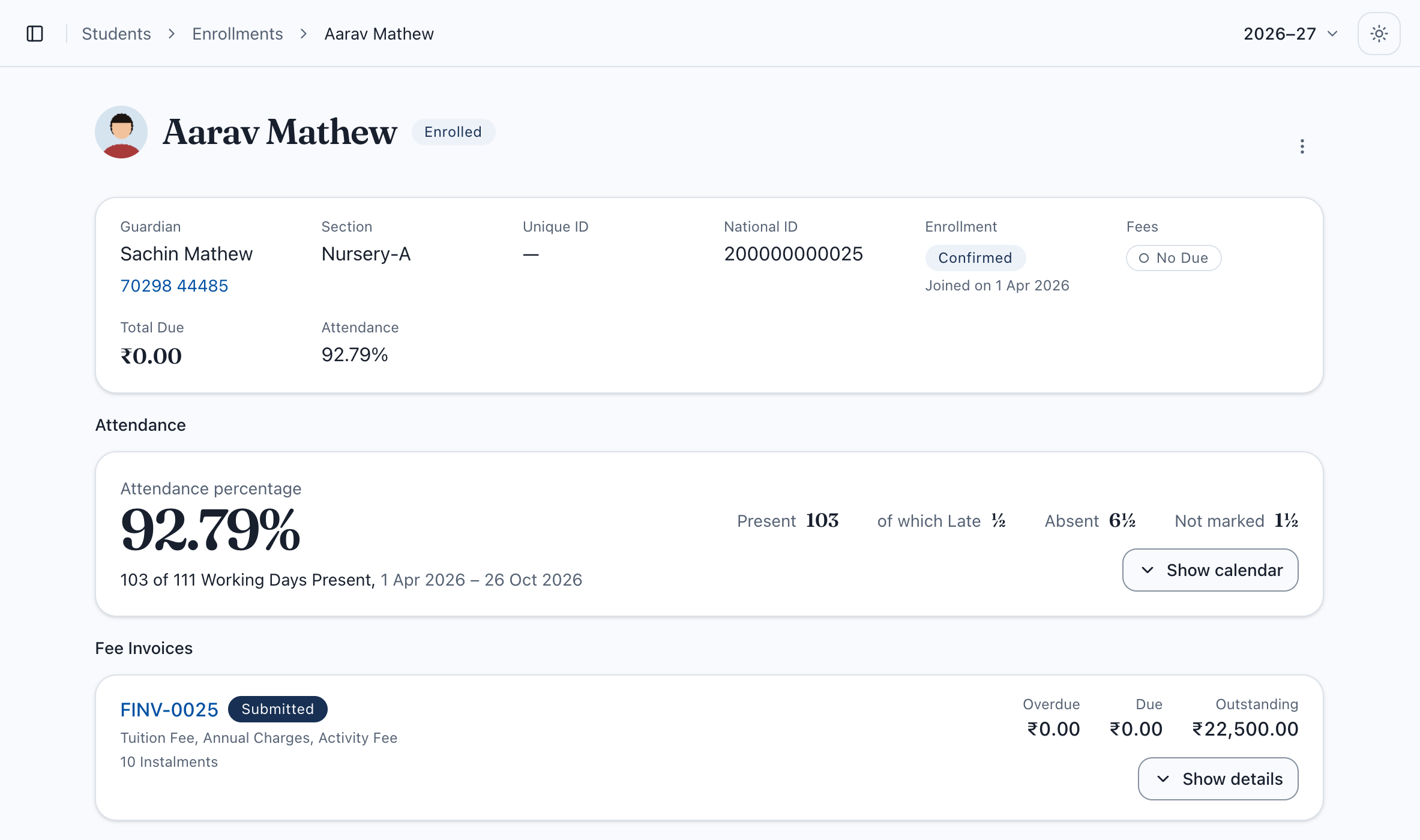
The parent’s name and phone, the section, what is due, the fee status and attendance for the year, all together. Search by the student’s name or the parent’s phone from any screen.
No Due or Overdue at a glance
Attendance for the year so far
Brothers and sisters found by the parent’s phone
Expenses
“Where did last month’s petty cash go?”
Every expense recorded, with the bill attached.
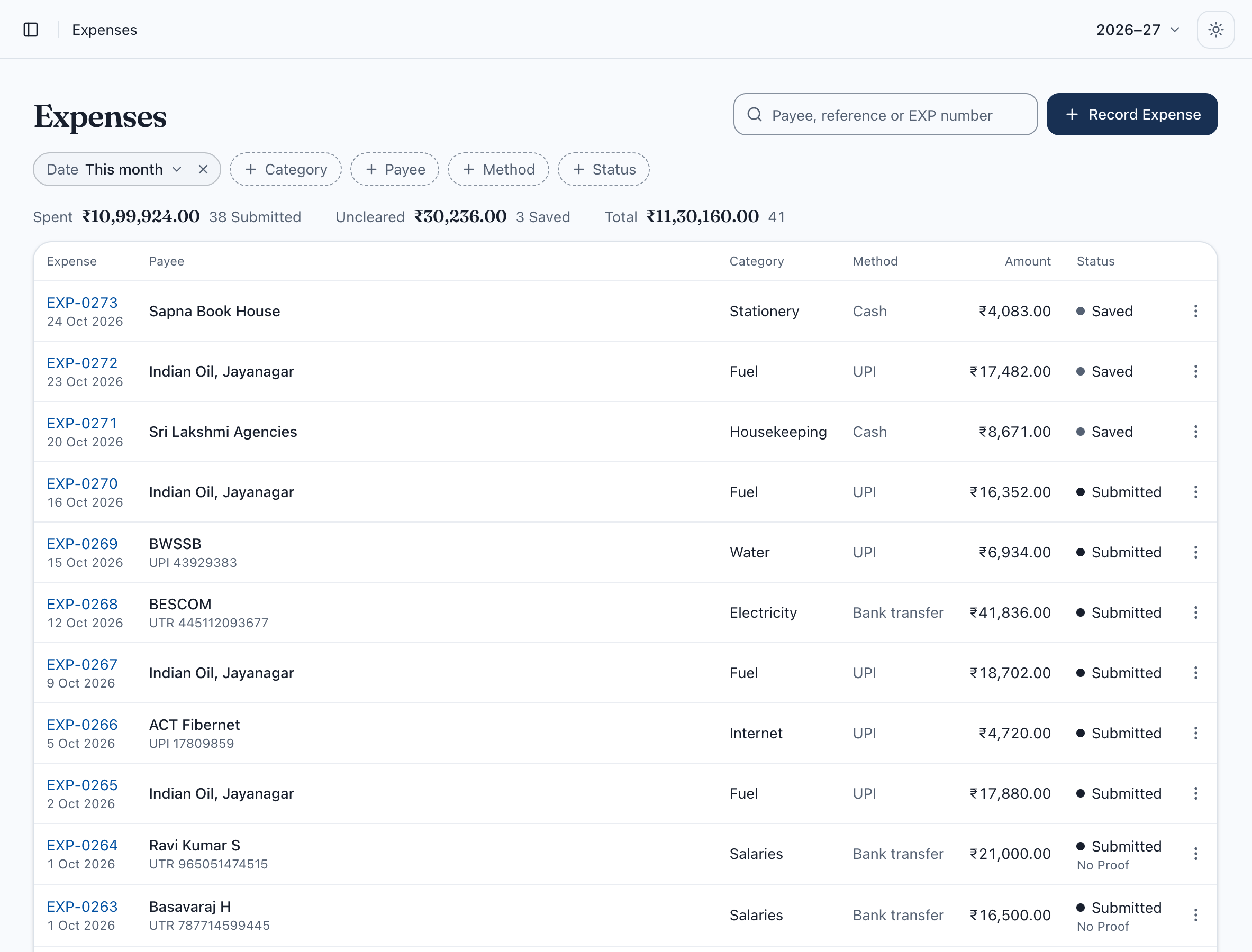
Record what was paid, to whom, how and under which category, and attach the bill. An expense counts once it is submitted, and every change is saved with who made it.
Categories such as fuel, salaries and electricity
Payment vouchers to print
Spending by date, category and payee
Screens from Eduflowy with a demo school. Names and numbers are made up.
02Beyond the office
One system. A different view for each person.
Teachers see their class. Parents see their own children. Owners see fees and expenses.
Exams, marks and progress reports.
Choose your Board (CBSE, ICSE or SCERT Telangana) and its exam pattern comes ready-made, or set your own. Subject teachers enter Exam Marks for their own subjects, Eduflowy works out totals and grades, and progress reports print a section at a time.
10-A · MathsFA /20SA /80TotalGrade
Kavya R.187492A1
Arjun N.155671B1
Dev P.142438D
Sana M.166379B1
Telangana SSC: FA is the average of FA1 to FA4. A written score under 28 of 80 is flagged.
Hall Tickets go only to students with no fees due, unless you let one through.
Attendance from a phone.
Teachers mark the register on their phone, and tap only the children who are absent or late. The office sees the day’s attendance as it comes in.
5-B · Morning
Aarav K.
Diya S.
Ishaan R.
Meera K.
Save · 38 of 40
A portal for parents.
Parents see pending fees, download receipts, and check attendance for all their children in one place. Progress reports show there too.
Aarav Kumar · 5-BRamesh Kumar
Next due
₹8,500
Attendance
96%
Term 1
A2
Fee Receipt No. 0412Download
Turn more enquiries into admissions.
Keep every admission enquiry in one list, get reminded when to follow up, and see which families are close to taking a seat.
Enquiry2
Nikhil · 1-A
Riya · 3-A
Visit1
Tara · 6-B
Admitted1
Kabir · 1-B
03How it works
From spreadsheet to first receipt in three steps.
Bring the Excel sheet you already have. Set the fee structure once. Then collect your first fee.
Set up your session once.
Classes, sections and holidays
Fee structure for each class
Staff logins with the right access
Session 2026–27Holiday: Sunday
Class 1AB₹32,000 / yr
Class 5ABC₹41,500 / yr
Class 9AB₹56,000 / yr
Bring every student in from one sheet.
Reads “Class” and “Std” columns
Brothers and sisters linked by parent’s phone
Problems shown row by row
students-2026.xlsx412 lines checked
NameStdParent’s phone
Kavya Reddy3-A98490 22113
Arjun Nair6-B90031 77420
Sana Mirza6-B99666 10294
Dev Patel8-A98480 55021
Collect fees, take attendance, close the day.
Receipts numbered in order
Attendance on a phone
Expenses by category
Fees collected
₹1,84,500
Receipts
0391 to 0413
Present today
96.4%
Expenses
₹12,300
Cut of your fees
₹0
We never take a percentage of what you collect.
Fee instalments a year
10
Split the year’s fees the way parents pay.
Months free, paid yearly
2
Pay for ten months, use it for twelve.
Levels of staff access
4
Owner, admin, accountant and teacher.
04Pricing
One bill per school. No cut of your fees.
Priced by how many students you have, not by staff. Pay monthly, or pay yearly and get two months free.
More than 1,200 students, or several campuses? Talk to us
On every plan
Unlimited staff logins
Email support
₹0 cut of your fees, ever
Daily backups
Every update included
05FAQ
Questions schools ask us first.
Have another question? Write to us and someone from our team will reply.
We already manage with Excel and a receipt book. Why switch?
Excel lets two receipts share a number, and a payment can be typed against the wrong child. Eduflowy gives every receipt the next number, keeps a record of every correction, and brings up brothers and sisters together from the parent’s phone number. Your office works the way it does today, with fewer mismatches to chase.
Do you take a cut of the fees we collect?
No. You pay one fixed price for your school, based on how many students you have. Eduflowy never takes a share of the fees you collect.
Do we have to pay for a whole year?
No. You can pay monthly. If you pay yearly, you pay for ten months and use it for twelve.
How long does it take to get started?
You can collect your first fee as soon as your classes and fee structure are in. Starter includes a setup call where we walk you through it. On Growth and Scale, we set up your fee structure and staff logins for you. Students come in from the Excel sheet you already have.
Our teachers can’t use mobile phones in school. How is attendance marked?
Attendance works on a computer as well as a phone. Teachers can keep using the paper register, and an admin or your computer operator enters it from the office. It takes a few minutes for each class. Staff logins are unlimited on every plan, so your operator gets their own.
Can teachers see fee amounts?
No. Each person gets the access their job needs. Teachers take attendance for their own class, and will enter Exam Marks only for the subjects they teach. Accountants see fees and expenses. Owners and admins see everything. Parents see only their own children.
Is our school’s data safe?
Your school’s records are kept separate from every other school’s. Everything is backed up daily. A receipt is never changed quietly: any correction or cancellation is saved with who made it and when.